Automation: Git, Athena(SQL) and Deploy index.html to S3 Storage with CI/CD
Prerequisites
1
2
3
4
| S3
Athena
Git
CI/CD
|
1. Overview: Git, Athena(SQL) and Deploy index.html to S3 Storage
Processing pipeline
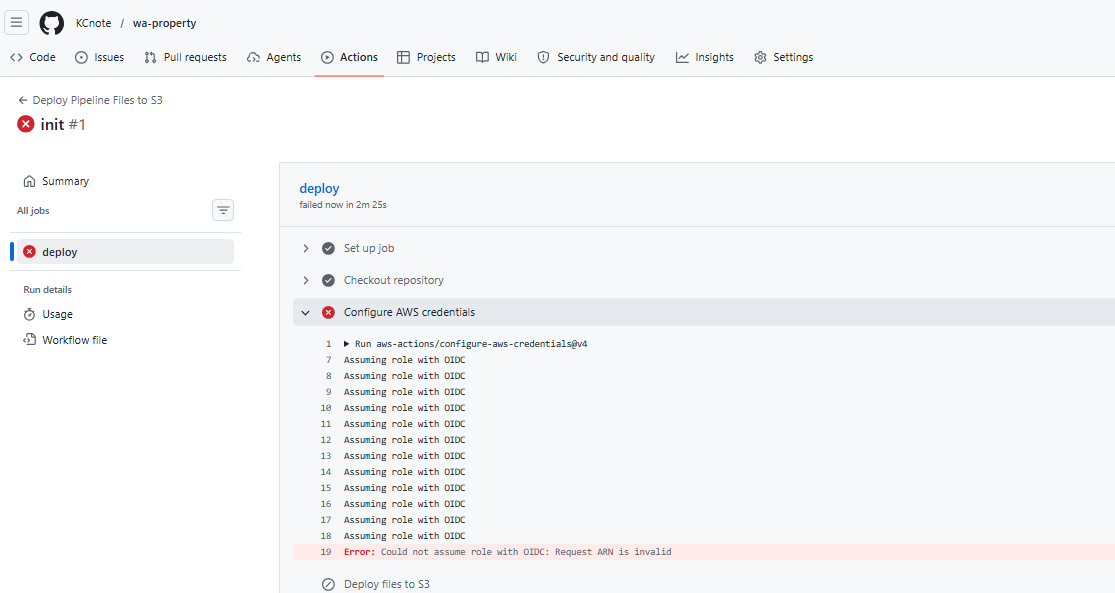
<1> Check point: init
- create git repository
- folder: src(.py), sql(.sql), config, .github/workflows(.yml)
- create ci/cd
- aws-action/configure-aws-credential
- create s3
- attach policy for access s3
- deploy git local files to s3 with ci/cd
<2> Check point: Athena Preprocessing
- attach policy to role
- athena:function
- glue:function
- s3:function(if necessary)
- create .sql files for execute on python
- create python execuation included .sql files
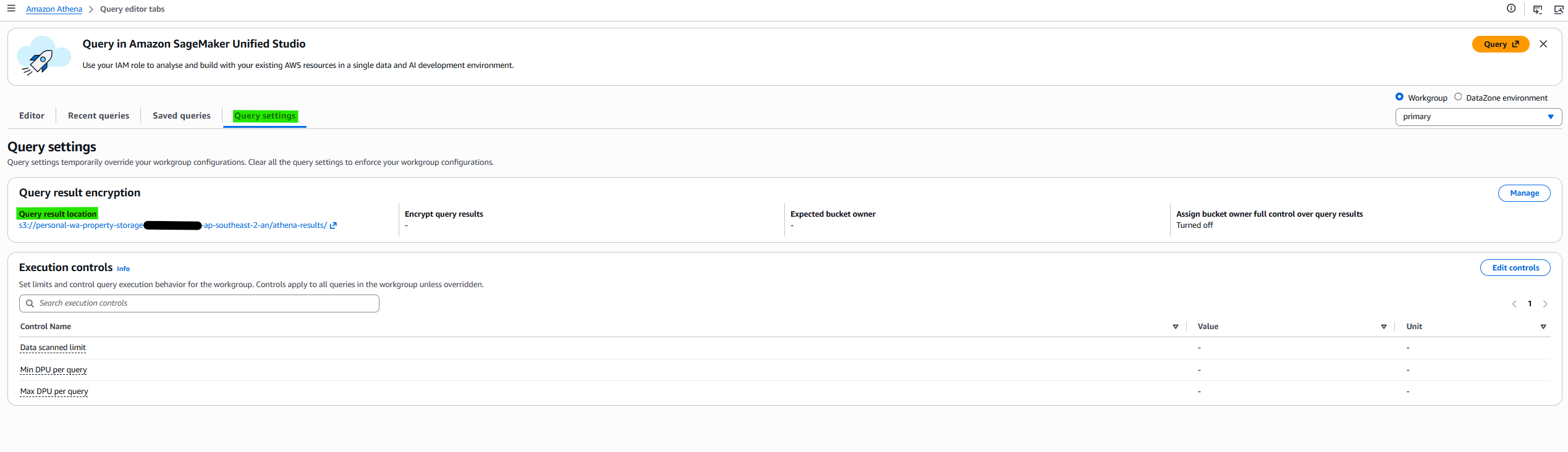
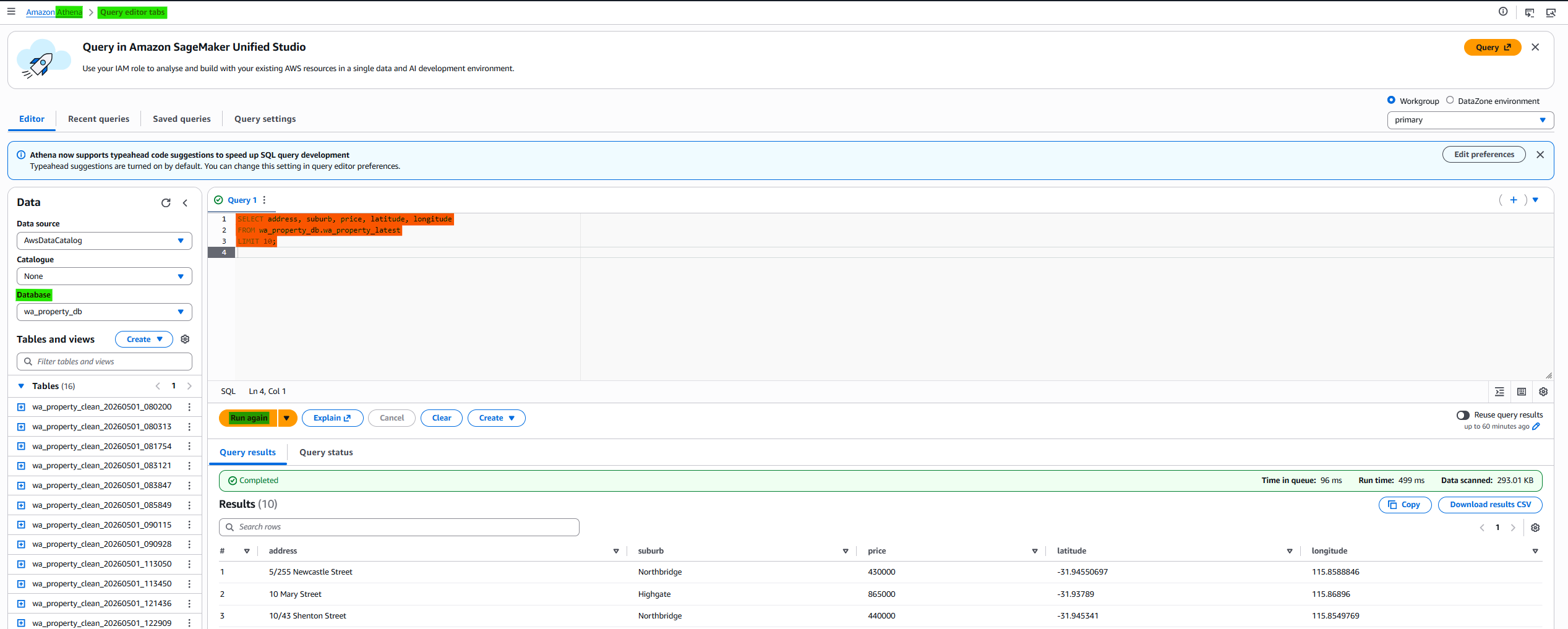
- Check the db on Athena
- raw data
- proceed data
- test: raw data with query
- Add CI/CD process
<3> Check point: Anaylsis
- with db, analysis and derived results.
- using python
<4> Check point: Deploy on S3
- create another s3 for public deploy
- public access setting
- Add CI/CD process
CI/CD pipeline
- aws-action/configure-aws-credential
- deploy git local files to s3
- python setting: version, pip install (with requirements.txt)
- run athena qurey(.py) (for sql): data preprocessing
- run map result(.py)
2. Check point: init
2-1. create git repository
1
2
3
4
5
| wa-property/
├── sql/
├── src/
├── config/
└── .github/workflows/
|
Build Hierarchy
1
2
3
4
5
6
7
8
| mkdir wa-property
cd wa-property
mkdir sql src config .github .github/workflows
echo "SELECT 1;" > sql/test.sql
echo "{}" > config/schema.json
echo "print('hello pipeline')" > src/pipeline.py
|
git init
1
2
| git init
git branch -M main
|
2-2. create role
In this post, the role name: GitHubActionsDeployRole (with empty policy)
If not:
2-2. create s3
- attach policy to GitHubActionsDeployRole role for access s3
Policy: s3-personal-wa-property-storage-allowance
1
2
3
4
5
6
7
8
9
10
11
12
13
14
15
16
17
18
19
20
21
22
| {
"Version": "2012-10-17",
"Statement": [
{
"Effect": "Allow",
"Action": [
"s3:ListBucket",
"s3:GetBucketLocation"
],
"Resource": "arn:aws:s3:::personal-wa-property-storage-xxxxxx-ap-southeast-2-an"
},
{
"Effect": "Allow",
"Action": [
"s3:PutObject",
"s3:DeleteObject",
"s3:GetObject"
],
"Resource": "arn:aws:s3:::personal-wa-property-storage-xxxxxx-ap-southeast-2-an/*"
}
]
}
|
2-3. ci/cd
- aws-action/configure-aws-credential
- connecting role(IAM), region
- -deploy git local files to s3 with ci/cd
1
2
3
4
5
6
7
8
9
10
11
12
13
14
15
16
17
18
19
20
21
22
23
24
25
26
27
28
29
30
31
| name: Deploy Pipeline Files to S3
on:
push:
branches:
- main
jobs:
deploy:
runs-on: ubuntu-latest
permissions:
id-token: write
contents: read
steps:
- name: Checkout repository
uses: actions/checkout@v4
- name: Configure AWS credentials
uses: aws-actions/configure-aws-credentials@v4
with:
# you make new role manually
role-to-assume: arn:aws:iam::xxxxxx:role/GitHubActionsDeployRole
aws-region: ap-southeast-2
- name: Deploy files to S3
run: |
aws s3 sync sql/ s3://personal-wa-property-storage-xxxxxx-ap-southeast-2-an/app/sql/ --delete
aws s3 sync src/ s3://personal-wa-property-storage-xxxxxx-ap-southeast-2-an/app/src/ --delete
aws s3 sync config/ s3://personal-wa-property-storage-xxxxxx-ap-southeast-2-an/app/config/ --delete
|
3. Check point: Athena Preprocessing
3-1. attach policy to role
- attach policy to role (GitHubActionsDeployRole)
- athena:function
- glue:function
- s3:function(if necessary)
Policy: athena-allowance
1
2
3
4
5
6
7
8
9
10
11
12
13
14
15
| {
"Version": "2012-10-17",
"Statement": [
{
"Effect": "Allow",
"Action": [
"athena:StartQueryExecution",
"athena:GetQueryExecution",
"athena:GetQueryResults",
"athena:StopQueryExecution"
],
"Resource": "*"
}
]
}
|
Policy: glue-allowance
1
2
3
4
5
6
7
8
9
10
11
12
13
14
15
16
17
18
19
20
21
22
| {
"Version": "2012-10-17",
"Statement": [
{
"Effect": "Allow",
"Action": [
"glue:CreateDatabase",
"glue:GetDatabase",
"glue:GetDatabases",
"glue:GetTable",
"glue:GetTables",
"glue:CreateTable",
"glue:UpdateTable",
"glue:DeleteTable",
"glue:GetPartitions",
"glue:CreatePartition",
"glue:BatchCreatePartition"
],
"Resource": "*"
}
]
}
|
If there has authorization issue:
1
2
3
4
5
6
7
| {
"Effect": "Allow",
"Action": [
"s3:GetBucketLocation"
],
"Resource": "arn:aws:s3:::personal-wa-property-storage-xxxxxxx-ap-southeast-2-an"
}
|
3-2. sql processing pipline
Make Preprocessing pipeline (the number is order when function is called)
sql/ ├── 01_create_database.sql ├── 02_drop_raw_table.sql ├── 03_create_raw_table.sql └── 04_clean_property.sql
The .sql file should have one command. If you wanna have command over two, making over two files.
01_create_database.sql
1
| CREATE DATABASE IF NOT EXISTS wa_property_db;
|
02_drop_raw_table.sql
1
| DROP TABLE IF EXISTS wa_property_db.wa_property_raw;
|
If you don’t drop the same name db, it makes error.
03_create_raw_table.sql
1
2
3
4
5
6
7
8
9
10
11
12
13
14
15
16
17
18
19
20
21
22
23
24
25
26
27
28
29
30
31
32
| CREATE EXTERNAL TABLE wa_property_db.wa_property_raw (
address string,
suburb string,
price int,
bedrooms int,
bathrooms int,
garage int,
land_area double,
floor_area double,
build_year int,
cbd_dist double,
nearest_stn string,
nearest_stn_dist double,
date_sold string,
postcode int,
latitude double,
longitude double,
nearest_sch string,
nearest_sch_dist double,
nearest_sch_rank int
)
ROW FORMAT SERDE 'org.apache.hadoop.hive.serde2.OpenCSVSerde'
WITH SERDEPROPERTIES (
'separatorChar' = ',',
'quoteChar' = '"'
)
STORED AS TEXTFILE
LOCATION 's3://personal-wa-property-storage-xxxxxx-ap-southeast-2-an/raw/property/'
TBLPROPERTIES (
'skip.header.line.count'='1',
'use.null.for.invalid.data'='true'
);
|
Files in LOCATION should have same variables.
04_clean_property.sql
1
2
3
4
5
6
7
8
9
10
11
12
13
14
15
16
17
18
19
20
21
22
23
24
25
26
27
28
29
30
31
32
| CREATE TABLE wa_property_db.{table_name}
WITH (
format = 'PARQUET',
external_location = '{output_path}'
) AS
SELECT
address,
suburb,
price,
bedrooms,
bathrooms,
garage,
land_area,
floor_area,
cbd_dist,
nearest_stn,
nearest_stn_dist,
date_sold,
postcode,
latitude,
longitude,
nearest_sch,
nearest_sch_dist,
nearest_sch_rank
FROM wa_property_db.wa_property_raw
WHERE bedrooms <= 5
AND bathrooms <= 3
AND garage <= 2
AND land_area BETWEEN 400 AND 800
AND date_parse(date_sold, '%m-%Y') >= DATE '2015-01-01'
ORDER BY postcode;
|
To better reflect properties that are commonly targeted by average home buyers, the data was preprocessed with several practical constraints. The selection was limited to houses with no more than five bedrooms, three bathrooms, and two garage spaces, which align with typical family housing standards. Furthermore, properties with land areas between 400 and 800 square meters were chosen to exclude outliers such as very small lots or large estates. Finally, only properties sold within the past five years were included to ensure that the analysis captures recent market conditions.
3-3. execute python for call sql
run_athena_query.py
1
2
3
4
5
6
7
8
9
10
11
12
13
14
15
16
17
18
19
20
21
22
23
24
25
26
27
28
29
30
31
32
33
34
35
36
37
38
39
40
41
42
43
44
45
46
47
48
49
50
51
52
53
54
55
56
57
58
59
60
61
62
63
64
65
66
67
68
69
70
71
72
73
74
75
76
77
78
79
80
81
82
83
84
| import boto3
import time
from pathlib import Path
from datetime import datetime, timezone
athena = boto3.client("athena", region_name="ap-southeast-2")
DATABASE = "wa_property_db"
OUTPUT = "s3://personal-wa-property-storage-xxxxxxx-ap-southeast-2-an/athena-results/" # SQL result files
QUERY_FILES = [
"sql/01_create_database.sql",
"sql/02_drop_raw_table.sql",
"sql/03_create_raw_table.sql",
"sql/04_clean_property.sql",
]
def run_query(query, name=""):
response = athena.start_query_execution(
QueryString=query,
QueryExecutionContext={"Database": DATABASE},
ResultConfiguration={"OutputLocation": OUTPUT},
)
query_id = response["QueryExecutionId"]
print(f"Running {name}: {query_id}")
while True:
result = athena.get_query_execution(QueryExecutionId=query_id)
status_info = result["QueryExecution"]["Status"]
status = status_info["State"]
if status in ["SUCCEEDED", "FAILED", "CANCELLED"]:
print(f"{name} status:", status)
if status != "SUCCEEDED":
reason = status_info.get("StateChangeReason", "")
raise RuntimeError(f"{name} failed: {reason}")
break
time.sleep(2)
def main():
# for escaping same name db and backup
run_id = datetime.now(timezone.utc).strftime("%Y%m%d_%H%M%S")
output_path = (
"s3://personal-wa-property-storage-xxxxxxx-ap-southeast-2-an/"
f"processed/property_clean/run_id={run_id}/"
)
table_name = f"wa_property_clean_{run_id}"
print("Run ID:", run_id)
print("Output path:", output_path)
print("Table name:", table_name)
# execuet sql process set
for query_file in QUERY_FILES:
query = Path(query_file).read_text()
query = query.format(
output_path=output_path,
table_name=table_name,
)
run_query(query, query_file)
# the name include version for escaping same name db and backup
view_query = f"""
CREATE OR REPLACE VIEW wa_property_db.wa_property_latest AS
SELECT *
FROM wa_property_db.{table_name}
"""
run_query(view_query, "create_latest_view")
print("✅ Latest view updated:", table_name)
if __name__ == "__main__":
main()
|
3-4. Check Athena and test
- Check the db on Athena
- raw data
- proceed data
- test: raw data with query
requirements.txt include just install package names
1
2
3
4
5
6
7
8
9
10
11
12
13
14
15
16
17
18
19
20
21
22
23
24
25
26
27
28
29
30
31
32
33
34
35
36
37
38
39
40
41
42
43
44
| name: Deploy Pipeline Files to S3
on:
push:
branches:
- main
jobs:
deploy:
runs-on: ubuntu-latest
permissions:
id-token: write
contents: read
steps:
- name: Checkout repository
uses: actions/checkout@v4
- name: Configure AWS credentials
uses: aws-actions/configure-aws-credentials@v4
with:
role-to-assume: arn:aws:iam::xxxxxxx:role/GitHubActionsDeployRole-wa-property
aws-region: ap-southeast-2
- name: Deploy files to S3
run: |
aws s3 sync sql/ s3://personal-wa-property-storage-xxxxxxx-ap-southeast-2-an/app/sql/ --delete
aws s3 sync src/ s3://personal-wa-property-storage-xxxxxxx-ap-southeast-2-an/app/src/ --delete
aws s3 sync config/ s3://personal-wa-property-storage-xxxxxxx-ap-southeast-2-an/app/config/ --delete
- name: Set up Python
uses: actions/setup-python@v5
with:
python-version: "3.11"
- name: Install Python dependencies
run: |
python -m pip install --upgrade pip
pip install -r requirements.txt
- name: Run Athena SQL pipeline
run: |
python src/run_athena_query.py
|
4. Check point: Anaylsis
make_map.py
1
2
3
4
5
6
7
8
9
10
11
12
13
14
15
16
17
18
19
20
21
22
23
24
25
26
27
28
29
30
31
32
33
34
35
36
37
38
39
40
41
42
43
44
45
46
47
48
49
50
51
52
53
54
55
56
57
58
59
60
61
62
63
64
65
66
67
68
69
70
71
72
73
74
75
76
77
78
79
80
81
82
83
84
85
86
87
88
89
90
91
92
93
94
95
96
97
98
99
100
101
102
103
104
105
106
107
108
109
110
111
112
113
114
115
116
117
118
119
120
121
| import awswrangler as wr
import folium
from folium.plugins import MarkerCluster
DATABASE = "wa_property_db"
TABLE = "wa_property_latest"
ATHENA_OUTPUT = "s3://personal-wa-property-storage-xxxxxxx-ap-southeast-2-an/athena-results/"
DEPLOY_BUCKET = "personal-wa-property-server-xxxxxxx-ap-southeast-2-an"
OUTPUT_HTML = "index.html"
def load_data():
sql = f"""
SELECT
address,
suburb,
price,
bedrooms,
bathrooms,
garage,
land_area,
floor_area,
date_sold,
postcode,
latitude,
longitude,
nearest_sch,
nearest_sch_dist
FROM {DATABASE}.{TABLE}
WHERE latitude IS NOT NULL
AND longitude IS NOT NULL
AND price IS NOT NULL
"""
return wr.athena.read_sql_query(
sql=sql,
database=DATABASE,
s3_output=ATHENA_OUTPUT,
)
def price_color(price):
if price < 500000:
return "green"
if price < 800000:
return "orange"
return "red"
def create_map(df):
if df.empty:
raise RuntimeError("No data found from Athena.")
center_lat = df["latitude"].mean()
center_lon = df["longitude"].mean()
m = folium.Map(
location=[center_lat, center_lon],
zoom_start=10,
tiles="OpenStreetMap",
)
cluster = MarkerCluster().add_to(m)
for _, row in df.iterrows():
popup = f"""
<b>{row["address"]}</b><br>
Suburb: {row["suburb"]}<br>
Price: ${row["price"]:,.0f}<br>
Bedrooms: {row["bedrooms"]}<br>
Bathrooms: {row["bathrooms"]}<br>
Garage: {row["garage"]}<br>
Land area: {row["land_area"]}<br>
Floor area: {row["floor_area"]}<br>
Sold: {row["date_sold"]}<br>
School: {row["nearest_sch"]}<br>
School dist: {row["nearest_sch_dist"]}
"""
folium.CircleMarker(
location=[row["latitude"], row["longitude"]],
radius=5,
color=price_color(row["price"]),
fill=True,
fill_color=price_color(row["price"]),
fill_opacity=0.75,
popup=folium.Popup(popup, max_width=350),
).add_to(cluster)
return m
def upload_to_s3():
wr.s3.upload(
local_file=OUTPUT_HTML,
path=f"s3://{DEPLOY_BUCKET}/{OUTPUT_HTML}",
boto3_session=None,
s3_additional_kwargs={
"ContentType": "text/html; charset=utf-8",
"CacheControl": "no-cache",
},
)
def main():
df = load_data()
print("Loaded rows:", len(df))
print(df.head())
m = create_map(df)
m.save(OUTPUT_HTML)
print(f"Generated {OUTPUT_HTML}")
upload_to_s3()
print(f"Uploaded to s3://{DEPLOY_BUCKET}/{OUTPUT_HTML}")
if __name__ == "__main__":
main()
|
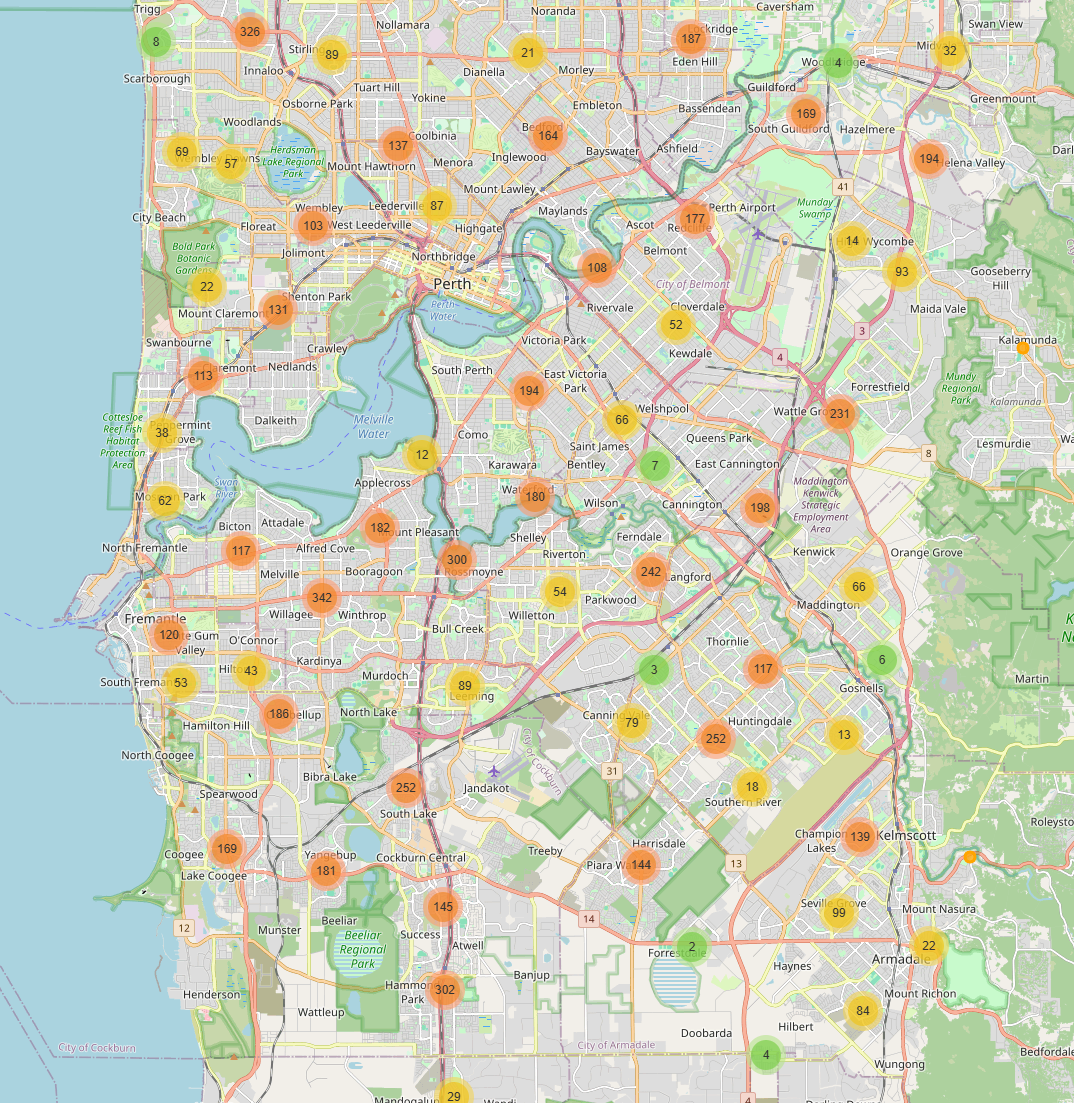
Local result:
5. Check point: Deploy on S3
5-1. create another s3 for public deploy
- Block Public Access settings for this bucket: False
- Properties -> Static website hosting
- Static website hosting: Enable
- Index document: index.html
- Permissions -> Bucket Policy
1
2
3
4
5
6
7
8
9
10
11
12
| {
"Version": "2012-10-17",
"Statement": [
{
"Sid": "PublicReadForWebsite",
"Effect": "Allow",
"Principal": "*",
"Action": "s3:GetObject",
"Resource": "arn:aws:s3:::personal-wa-property-server-xxxxxxx-ap-southeast-2-an/*"
}
]
}
|
5-2. Add Policy to GitHubActionsDeployRole
- attach policy to GitHubActionsDeployRole role for access s3
Policy: s3-personal-wa-property-server-allowance
1
2
3
4
5
6
7
8
9
10
11
12
13
14
15
16
17
18
19
20
21
22
| {
"Version": "2012-10-17",
"Statement": [
{
"Effect": "Allow",
"Action": [
"s3:ListBucket",
"s3:GetBucketLocation"
],
"Resource": "arn:aws:s3:::personal-wa-property-server-337164669284-ap-southeast-2-an"
},
{
"Effect": "Allow",
"Action": [
"s3:PutObject",
"s3:DeleteObject",
"s3:GetObject"
],
"Resource": "arn:aws:s3:::personal-wa-property-server-337164669284-ap-southeast-2-an/*"
}
]
}
|
5-3. Add CI/CD process
1
2
3
4
5
6
7
8
9
10
11
12
13
14
15
16
17
18
19
20
21
22
23
24
25
26
27
28
29
30
31
32
33
34
35
36
37
38
39
40
41
42
43
44
45
46
47
48
| name: Deploy Pipeline Files to S3
on:
push:
branches:
- main
jobs:
deploy:
runs-on: ubuntu-latest
permissions:
id-token: write
contents: read
steps:
- name: Checkout repository
uses: actions/checkout@v4
- name: Configure AWS credentials
uses: aws-actions/configure-aws-credentials@v4
with:
role-to-assume: arn:aws:iam::337164669284:role/GitHubActionsDeployRole-wa-property
aws-region: ap-southeast-2
- name: Deploy files to S3
run: |
aws s3 sync sql/ s3://personal-wa-property-storage-337164669284-ap-southeast-2-an/app/sql/ --delete
aws s3 sync src/ s3://personal-wa-property-storage-337164669284-ap-southeast-2-an/app/src/ --delete
aws s3 sync config/ s3://personal-wa-property-storage-337164669284-ap-southeast-2-an/app/config/ --delete
- name: Set up Python
uses: actions/setup-python@v5
with:
python-version: "3.11"
- name: Install Python dependencies
run: |
python -m pip install --upgrade pip
pip install -r requirements.txt
- name: Run Athena SQL pipeline
run: |
python src/run_athena_query.py
- name: Generate and deploy map
run: |
python src/make_map.py
|
6. Tracking Not working the html file
In this case, the process is good, but the index.html is not working on network even though the index.html is working on local. Through s3 index.html is suddenly won’t open and just closes immediately.
At the first time the upload_to_s3 function is like:
1
2
3
4
5
6
7
8
9
10
| def upload_to_s3():
wr.s3.upload(
local_file=OUTPUT_HTML,
path=f"s3://{DEPLOY_BUCKET}/{OUTPUT_HTML}",
boto3_session=None,
#s3_additional_kwargs={
# "ContentType": "text/html; charset=utf-8",
# "CacheControl": "no-cache",
#},
)
|
and then, check the head-object about index.html
1
| aws s3api head-object --bucket personal-wa-property-server-337164669284-ap-southeast-2-an --key index.html
|
1
2
3
4
5
6
7
8
9
| {
"AcceptRanges": "bytes",
"LastModified": "2026-05-01T12:29:34+00:00",
"ContentLength": 10830,
"ETag": "\"a07d09cb67044c8e1f3bb0893261b43f\"",
"ContentType": "binary/octet-stream",
"ServerSideEncryption": "AES256",
"Metadata": {}
}
|
The problem is “ContentType” is not “text/html”, but “binary/octet-stream”. So the website is not working. It is just binary.
So when i revised the code upload_to_s3 and working:
1
2
3
4
5
6
7
8
9
10
| {
"AcceptRanges": "bytes",
"LastModified": "2026-05-01T13:07:15+00:00",
"ContentLength": 20432098,
"ETag": "\"bd28724c79a2d7976376f89007b5e20f-3\"",
"CacheControl": "no-cache",
"ContentType": "text/html; charset=utf-8",
"ServerSideEncryption": "AES256",
"Metadata": {}
}
|
or:
1
| aws s3 cp index.html s3://personal-wa-property-server-xxxxxxx-ap-southeast-2-an/index.html --content-type "text/html; charset=utf-8" --cache-control "no-cache"
|