27. AI Model from deploy to Lambda + S3 with SageMaker
AI Model from deploy to Lambda + S3 with SageMaker
Prerequisites
1
2
3
4
Deploy of endpoint from SageMaker
Lambda
S3
API Gateway
1. Connection with endpoint and Lambda
1-1. Check endpoint exist
1
2
3
aws sagemaker describe-endpoint \
  --endpoint-name mnist-cnn-endpoint \
  --query EndpointStatus
Result: InService
1-1. Create Lambda
1
Simple Connection with model and test
- Runtime: python
- Add Roles with InvokeEndpoint Policy
1
2
3
4
5
{
  "Effect": "Allow",
  "Action": "sagemaker:InvokeEndpoint",
  "Resource": "arn:aws:sagemaker:ap-southeast-2:xxxxxx:endpoint/mnist-cnn-endpoint"
}
Test: Event JSON
1
2
3
{
  "body": "{\"inputs\":[[0,0,0,0,0,0,0,0,0,0,0,0,0,0,0,0,0,0,0,0,0,0,0,0,0,0,0,0],[0,0,0,0,0,0,0,0,0,0,0,0,0,0,0,0,0,0,0,0,0,0,0,0,0,0,0,0],[0,0,0,0,0,0,0,0,0,0,0,0,0,0,0,0,0,0,0,0,0,0,0,0,0,0,0,0],[0,0,0,0,0,0,0,0,0,0,0,0,0,0,0,0,0,0,0,0,0,0,0,0,0,0,0,0],[0,0,0,0,0,0,0,0,0,0,0,0,0,0,0,0,0,0,0,0,0,0,0,0,0,0,0,0],[0,0,0,0,0,0,0,0,0,0,0,0,0,0,0,0,0,0,0,0,0,0,0,0,0,0,0,0],[0,0,0,0,0,0,0,0,0,0,0,0,0,0,0,0,0,0,0,0,0,0,0,0,0,0,0,0],[0,0,0,0,0,0,0,0,0,0,0,0,0,0,0,0,0,0,0,0,0,0,0,0,0,0,0,0],[0,0,0,0,0,0,0,0,0,0,0,0,0,0,0,0,0,0,0,0,0,0,0,0,0,0,0,0],[0,0,0,0,0,0,0,0,0,0,0,0,0,0,0,0,0,0,0,0,0,0,0,0,0,0,0,0],[0,0,0,0,0,0,0,0,0,0,0,0,0,0,0,0,0,0,0,0,0,0,0,0,0,0,0,0],[0,0,0,0,0,0,0,0,0,0,0,0,0,0,0,0,0,0,0,0,0,0,0,0,0,0,0,0],[0,0,0,0,0,0,0,0,0,0,0,0,0,0,0,0,0,0,0,0,0,0,0,0,0,0,0,0],[0,0,0,0,0,0,0,0,0,0,0,0,0,0,0,0,0,0,0,0,0,0,0,0,0,0,0,0],[0,0,0,0,0,0,0,0,0,0,0,0,0,0,0,0,0,0,0,0,0,0,0,0,0,0,0,0],[0,0,0,0,0,0,0,0,0,0,0,0,0,0,0,0,0,0,0,0,0,0,0,0,0,0,0,0],[0,0,0,0,0,0,0,0,0,0,0,0,0,0,0,0,0,0,0,0,0,0,0,0,0,0,0,0],[0,0,0,0,0,0,0,0,0,0,0,0,0,0,0,0,0,0,0,0,0,0,0,0,0,0,0,0],[0,0,0,0,0,0,0,0,0,0,0,0,0,0,0,0,0,0,0,0,0,0,0,0,0,0,0,0],[0,0,0,0,0,0,0,0,0,0,0,0,0,0,0,0,0,0,0,0,0,0,0,0,0,0,0,0],[0,0,0,0,0,0,0,0,0,0,0,0,0,0,0,0,0,0,0,0,0,0,0,0,0,0,0,0],[0,0,0,0,0,0,0,0,0,0,0,0,0,0,0,0,0,0,0,0,0,0,0,0,0,0,0,0],[0,0,0,0,0,0,0,0,0,0,0,0,0,0,0,0,0,0,0,0,0,0,0,0,0,0,0,0],[0,0,0,0,0,0,0,0,0,0,0,0,0,0,0,0,0,0,0,0,0,0,0,0,0,0,0,0],[0,0,0,0,0,0,0,0,0,0,0,0,0,0,0,0,0,0,0,0,0,0,0,0,0,0,0,0],[0,0,0,0,0,0,0,0,0,0,0,0,0,0,0,0,0,0,0,0,0,0,0,0,0,0,0,0],[0,0,0,0,0,0,0,0,0,0,0,0,0,0,0,0,0,0,0,0,0,0,0,0,0,0,0,0],[0,0,0,0,0,0,0,0,0,0,0,0,0,0,0,0,0,0,0,0,0,0,0,0,0,0,0,0]]}"
}
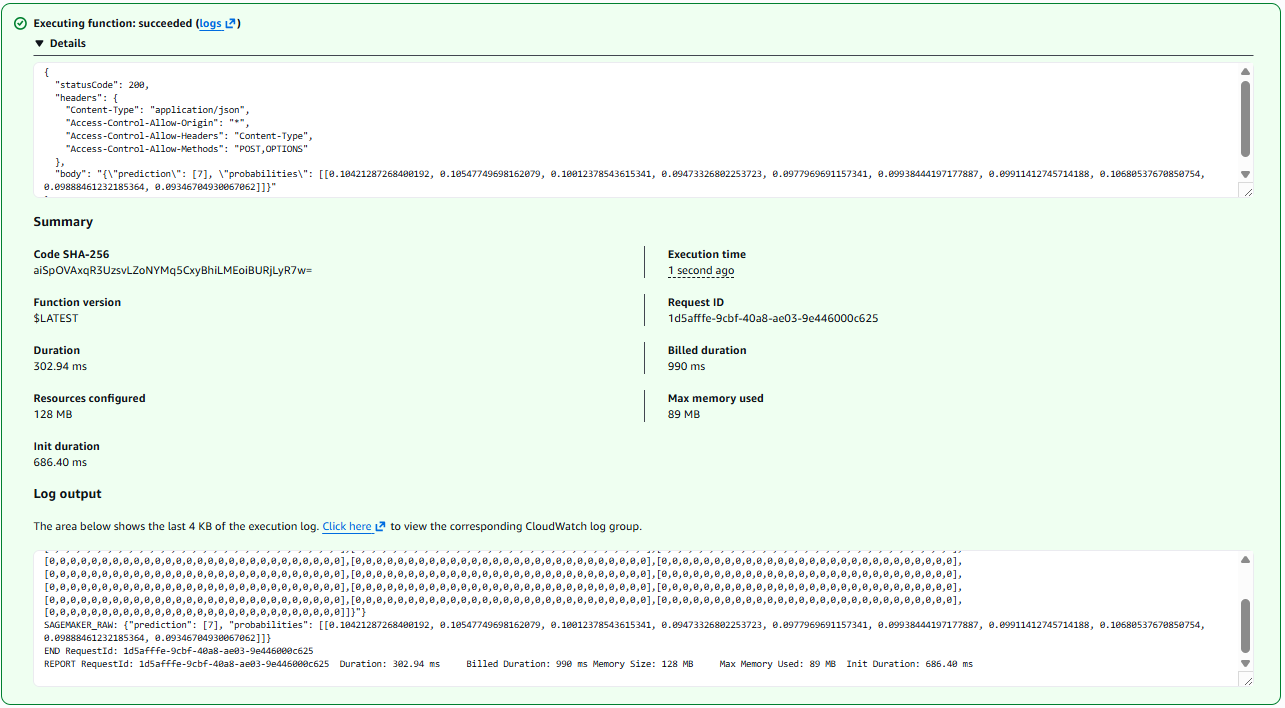
Should revise inference.py code for accepting various array shape
inference.py
1
2
3
4
5
6
7
8
9
10
11
12
13
14
15
16
17
18
19
20
21
22
23
24
def input_fn(request_body, content_type):
    import json
    import numpy as np
    import torch

    data = json.loads(request_body)

    array = np.array(data["inputs"], dtype=np.float32)

    # 28x28 -> 1x1x28x28
    if array.shape == (28, 28):
        array = array.reshape(1, 1, 28, 28)

    # 784 -> 1x1x28x28
    elif array.shape == (784,):
        array = array.reshape(1, 1, 28, 28)

    # 1x28x28 -> 1x1x28x28
    elif array.shape == (1, 28, 28):
        array = array.reshape(1, 1, 28, 28)

    tensor = torch.tensor(array, dtype=torch.float32)

    return tensor
1-2. Create S3 as page
1
Simple page upload and test
- Block Public Access settings for this bucket: False
- Properties -> Static website hosting
- Static website hosting: Enable
- Index document: index.html
- Permissions -> Bucket Policy
1
2
3
4
5
6
7
8
9
10
11
12
{
  "Version": "2012-10-17",
  "Statement": [
    {
      "Sid": "PublicReadGetObject",
      "Effect": "Allow",
      "Principal": "*",
      "Action": "s3:GetObject",
      "Resource": "arn:aws:s3:::YOUR_BUCKET_NAME/*"
    }
  ]
}
- Upload index.html file
1
2
3
4
5
6
7
8
9
10
11
12
13
14
15
16
17
18
19
20
21
22
23
24
25
26
27
28
29
30
31
32
33
34
35
36
37
38
39
40
41
42
43
44
45
46
47
48
49
50
51
52
53
54
55
56
57
58
59
60
61
62
63
64
65
66
67
68
69
70
71
72
73
74
75
76
77
78
79
80
81
82
83
84
85
86
87
88
89
90
91
92
93
94
95
96
97
98
99
100
101
102
103
104
105
106
107
108
109
110
111
112
113
114
115
116
117
118
119
120
121
122
123
124
125
126
127
128
129
130
131
132
133
134
135
136
137
138
139
140
141
142
143
144
145
146
147
148
149
150
151
152
153
154
155
156
157
158
159
160
161
162
163
164
165
166
167
168
169
170
171
172
173
174
175
176
177
178
179
180
181
182
183
184
185
186
187
188
189
190
191
192
193
194
195
196
197
198
199
200
201
202
203
204
205
206
207
208
209
210
211
212
213
214
215
216
217
218
219
220
221
222
223
224
225
226
227
228
229
230
231
232
233
234
235
236
237
238
239
240
241
242
243
244
245
246
247
248
249
250
251
252
253
254
255
256
257
258
259
260
261
262
263
264
265
266
267
268
269
270
271
272
273
274
275
276
277
278
279
280
281
282
283
284
285
286
287
288
289
290
291
292
293
294
295
296
297
298
299
300
301
302
303
304
305
306
307
308
309
310
311
312
313
314
315
316
317
318
319
320
321
322
323
324
325
326
327
328
329
330
331
332
333
334
335
336
337
338
339
340
341
342
343
344
345
346
347
348
349
350
351
352
353
354
355
356
357
358
359
360
361
362
363
364
365
366
367
368
369
370
371
372
373
374
375
376
377
378
379
380
381
382
383
384
385
386
387
388
389
390
391
392
<!DOCTYPE html>
<html lang="en">
<head>
  <meta charset="UTF-8" />
  <meta name="viewport" content="width=device-width, initial-scale=1.0" />
  <title>MNIST Serverless Classifier</title>

  <style>
    * {
      box-sizing: border-box;
    }

    body {
      margin: 0;
      min-height: 100vh;
      font-family: Arial, sans-serif;
      background: linear-gradient(135deg, #eff6ff, #dbeafe, #bfdbfe);
      color: #0f172a;
      display: flex;
      justify-content: center;
      align-items: center;
      padding: 32px;
    }

    .app {
      width: 100%;
      max-width: 860px;
      background: rgba(255, 255, 255, 0.88);
      border: 1px solid rgba(147, 197, 253, 0.55);
      border-radius: 28px;
      box-shadow: 0 24px 70px rgba(37, 99, 235, 0.18);
      overflow: hidden;
      backdrop-filter: blur(14px);
    }

    .header {
      padding: 34px 38px;
      background: linear-gradient(135deg, #2563eb, #38bdf8);
      color: white;
    }

    .header h1 {
      margin: 0;
      font-size: 34px;
      letter-spacing: -0.5px;
    }

    .header p {
      margin: 10px 0 0;
      opacity: 0.92;
      font-size: 16px;
    }

    .content {
      padding: 36px;
      display: grid;
      grid-template-columns: 1fr 1fr;
      gap: 28px;
    }

    .panel {
      background: #ffffff;
      border: 1px solid #dbeafe;
      border-radius: 22px;
      padding: 24px;
      box-shadow: 0 14px 35px rgba(30, 64, 175, 0.08);
    }

    .upload-box {
      border: 2px dashed #93c5fd;
      border-radius: 20px;
      padding: 26px;
      text-align: center;
      background: #f8fbff;
    }

    input[type="file"] {
      display: none;
    }

    .upload-label {
      display: inline-block;
      padding: 13px 22px;
      background: #2563eb;
      color: white;
      border-radius: 999px;
      font-weight: 700;
      cursor: pointer;
      box-shadow: 0 10px 24px rgba(37, 99, 235, 0.28);
      transition: 0.2s ease;
    }

    .upload-label:hover {
      transform: translateY(-1px);
      background: #1d4ed8;
    }

    .hint {
      margin-top: 14px;
      font-size: 13px;
      color: #64748b;
    }

    .preview-frame {
      margin-top: 22px;
      width: 100%;
      aspect-ratio: 1 / 1;
      border-radius: 22px;
      border: 1px solid #bfdbfe;
      background:
        linear-gradient(45deg, #f1f5f9 25%, transparent 25%),
        linear-gradient(-45deg, #f1f5f9 25%, transparent 25%),
        linear-gradient(45deg, transparent 75%, #f1f5f9 75%),
        linear-gradient(-45deg, transparent 75%, #f1f5f9 75%);
      background-size: 24px 24px;
      background-position: 0 0, 0 12px, 12px -12px, -12px 0;
      display: flex;
      justify-content: center;
      align-items: center;
      overflow: hidden;
    }

    canvas {
      width: 82%;
      height: 82%;
      image-rendering: pixelated;
      background: white;
      border-radius: 16px;
      border: 1px solid #e0f2fe;
      box-shadow: inset 0 0 0 1px rgba(37, 99, 235, 0.06);
    }

    .button-row {
      margin-top: 24px;
      display: flex;
      gap: 12px;
    }

    button {
      flex: 1;
      border: 0;
      border-radius: 16px;
      padding: 14px 18px;
      font-size: 15px;
      font-weight: 700;
      cursor: pointer;
      transition: 0.2s ease;
    }

    .predict-btn {
      color: white;
      background: linear-gradient(135deg, #2563eb, #0ea5e9);
      box-shadow: 0 14px 28px rgba(37, 99, 235, 0.25);
    }

    .predict-btn:hover {
      transform: translateY(-1px);
      box-shadow: 0 18px 36px rgba(37, 99, 235, 0.32);
    }

    .clear-btn {
      background: #eff6ff;
      color: #1d4ed8;
      border: 1px solid #bfdbfe;
    }

    .clear-btn:hover {
      background: #dbeafe;
    }

    .result-card {
      min-height: 100%;
      display: flex;
      flex-direction: column;
      justify-content: space-between;
    }

    .status-label {
      color: #2563eb;
      font-size: 13px;
      font-weight: 800;
      text-transform: uppercase;
      letter-spacing: 0.08em;
    }

    .result-main {
      margin-top: 22px;
    }

    .prediction-number {
      font-size: 92px;
      line-height: 1;
      font-weight: 900;
      color: #1d4ed8;
      letter-spacing: -5px;
    }

    .result-text {
      margin-top: 10px;
      color: #475569;
      font-size: 16px;
      line-height: 1.5;
      word-break: break-word;
    }

    .prob-box {
      margin-top: 22px;
      background: #f8fafc;
      border: 1px solid #e0f2fe;
      border-radius: 18px;
      padding: 16px;
      font-family: Consolas, monospace;
      font-size: 12px;
      color: #334155;
      max-height: 180px;
      overflow: auto;
      white-space: pre-wrap;
    }

    .footer {
      padding: 0 36px 34px;
      color: #64748b;
      font-size: 13px;
    }

    @media (max-width: 760px) {
      .content {
        grid-template-columns: 1fr;
      }

      .header h1 {
        font-size: 28px;
      }

      .prediction-number {
        font-size: 72px;
      }
    }
  </style>
</head>

<body>
  <main class="app">
    <section class="header">
      <h1>MNIST Serverless Classifier</h1>
      <p>Upload a handwritten digit image and classify it through API Gateway, Lambda, and SageMaker.</p>
    </section>

    <section class="content">
      <div class="panel">
        <div class="upload-box">
          <label for="fileInput" class="upload-label">Choose Image</label>
          <input type="file" id="fileInput" accept="image/*" />
          <div class="hint">PNG, JPG, or any handwritten digit image</div>
        </div>

        <div class="preview-frame">
          <canvas id="canvas" width="28" height="28"></canvas>
        </div>

        <div class="button-row">
          <button class="predict-btn" onclick="predict()">Predict</button>
          <button class="clear-btn" onclick="clearImage()">Clear</button>
        </div>
      </div>

      <div class="panel result-card">
        <div>
          <div class="status-label">Prediction Result</div>

          <div class="result-main">
            <div id="predictionNumber" class="prediction-number">—</div>
            <div id="result" class="result-text">Waiting for image...</div>
          </div>
        </div>

        <div id="probabilities" class="prob-box">probabilities will appear here</div>
      </div>
    </section>

    <div class="footer">
      The image is resized to 28×28, converted to grayscale, normalized, and sent as JSON.
    </div>
  </main>

  <script>
    const API_URL = "https://{ARN_API_Gateway_ID}.execute-api.ap-southeast-2.amazonaws.com/predict";

    const fileInput = document.getElementById("fileInput");
    const canvas = document.getElementById("canvas");
    const ctx = canvas.getContext("2d");
    const result = document.getElementById("result");
    const predictionNumber = document.getElementById("predictionNumber");
    const probabilities = document.getElementById("probabilities");

    let mnistInput = null;

    fileInput.addEventListener("change", () => {
      const file = fileInput.files[0];
      if (!file) return;

      const img = new Image();

      img.onload = () => {
        ctx.clearRect(0, 0, 28, 28);
        ctx.fillStyle = "white";
        ctx.fillRect(0, 0, 28, 28);
        ctx.drawImage(img, 0, 0, 28, 28);

        const imageData = ctx.getImageData(0, 0, 28, 28);
        const pixels = [];

        for (let i = 0; i < imageData.data.length; i += 4) {
          const r = imageData.data[i];
          const g = imageData.data[i + 1];
          const b = imageData.data[i + 2];

          let gray = (r + g + b) / 3.0 / 255.0;
          gray = (gray - 0.1307) / 0.3081;

          pixels.push(gray);
        }

        const rows = [];
        for (let i = 0; i < 28; i++) {
          rows.push(pixels.slice(i * 28, (i + 1) * 28));
        }

        mnistInput = [[rows]];

        predictionNumber.innerText = "—";
        result.innerText = "Image loaded. Ready to predict.";
        probabilities.innerText = "ready";
      };

      img.src = URL.createObjectURL(file);
    });

    async function predict() {
      if (!mnistInput) {
        result.innerText = "Please upload an image first.";
        return;
      }

      predictionNumber.innerText = "…";
      result.innerText = "Calling Lambda...";
      probabilities.innerText = "waiting for response...";

      try {
        const res = await fetch(API_URL, {
          method: "POST",
          headers: {
            "Content-Type": "application/json"
          },
          body: JSON.stringify({
            inputs: mnistInput
          })
        });

        const data = await res.json();

        if (!res.ok) {
          predictionNumber.innerText = "!";
          result.innerText = "Error: " + JSON.stringify(data);
          probabilities.innerText = "";
          return;
        }

        predictionNumber.innerText = data.prediction[0];
        result.innerText = "The model predicted digit " + data.prediction[0] + ".";
        probabilities.innerText = JSON.stringify(data.probabilities[0], null, 2);

      } catch (err) {
        predictionNumber.innerText = "!";
        result.innerText = "Request failed: " + err.message;
        probabilities.innerText = "";
      }
    }

    function clearImage() {
      fileInput.value = "";
      mnistInput = null;

      ctx.clearRect(0, 0, 28, 28);

      predictionNumber.innerText = "—";
      result.innerText = "Waiting for image...";
      probabilities.innerText = "probabilities will appear here";
    }
  </script>
</body>
</html>
Check Bucket website endpoint from Static website hosting
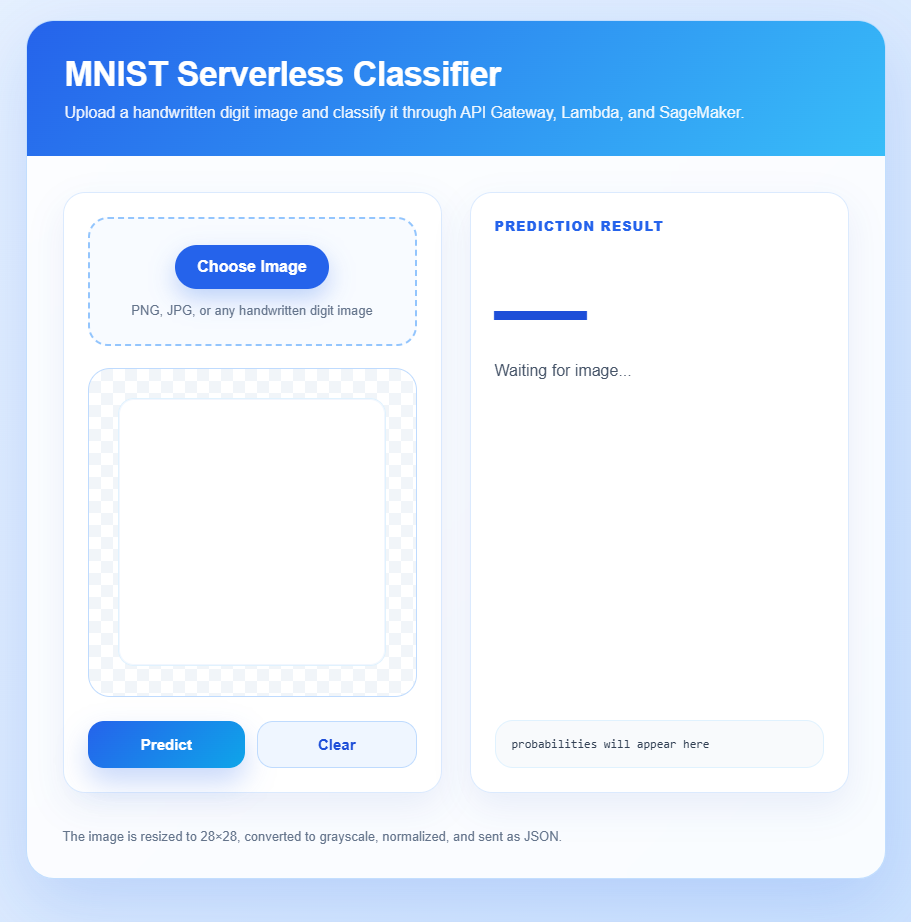
1-3. Create API Gateway
- HTTP API build
- Integration: lambda
- Configure routes
- Method: POST
- Name: /predict
- Configure stages
- Add stage
- Auto-deploy: false
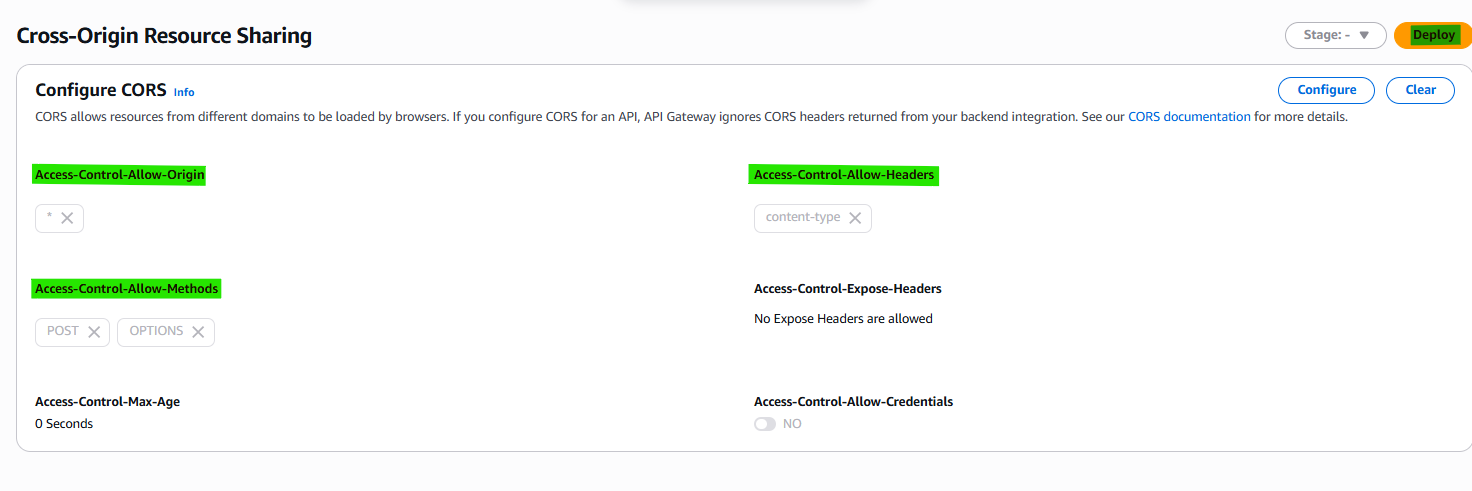
- CORS
- Setting as follow:
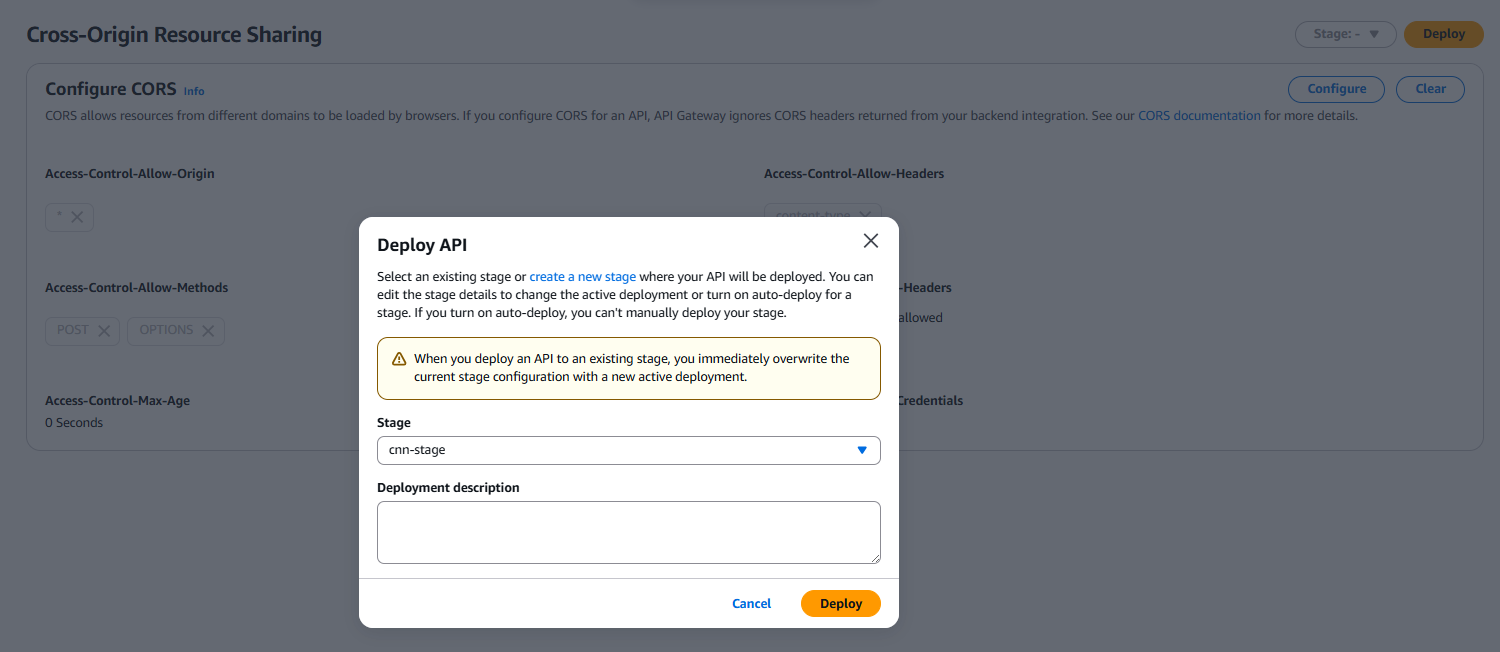
- Deploy to new stage you made
1-4. Connect Lambda with API Gateway
1
Integrate Lambda and Gateway
Already you have: Integration - lambda
1-5. Connect S3 with API Gateway
1
Integrate CORS S3 URL and API Gateway ARN
on CORS
1
2
3
4
Allow-Origin: *
Allow-Methods: POST, OPTIONS
Allow-Headers: content-type
Allow-Credentials: NO
revise index.html
1
2
3
4
5
6
7
const API_URL = "https://{ARN_API_Gateway_ID}.execute-api.{Region}.amazonaws.com/{Stage_Name}/{Route_Name}";
+
arn:aws:apigateway:ap-southeast-2::/apis/eolipx2is8/routes/ip1seyf
+
API Gateway/StageName: cnn-stage
=
const API_URL = "https://eolipx2is8.execute-api.ap-southeast-2.amazonaws.com/cnn-stage/predict";
If you fail predict button, on the s3 index.html website, press F12 and check console
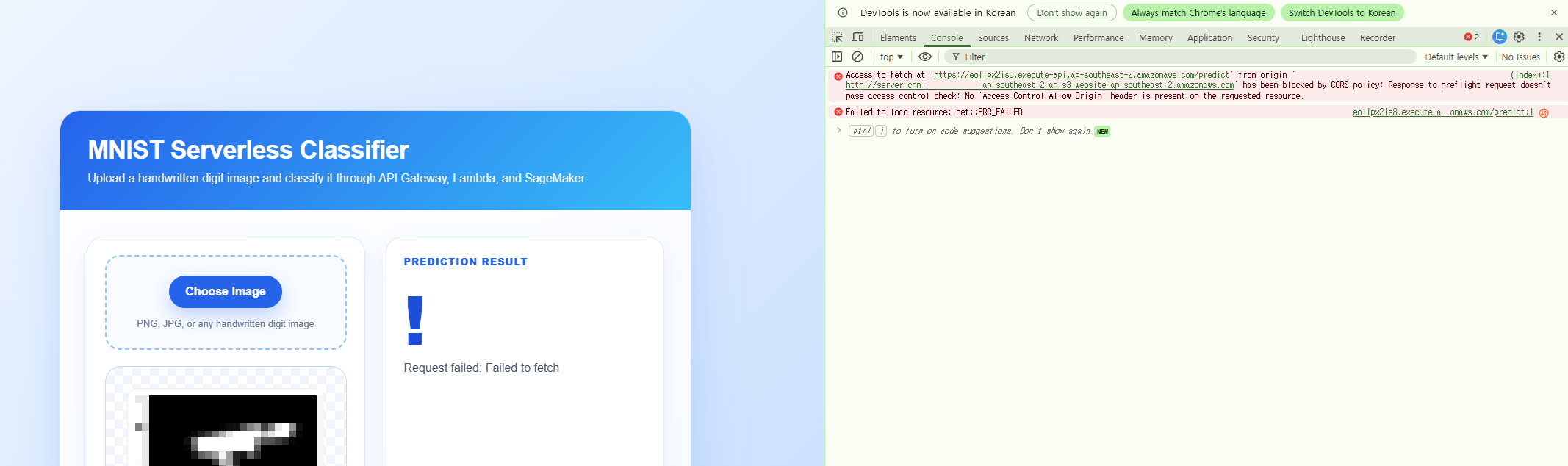
CORS
CORS (Cross-Origin Resource Sharing) is a security mechanism used by browsers to control requests between different origins (domains, ports, or protocols). It ensures that a web application can only access resources from another origin if that server explicitly allows it.
What happens if CORS is enabled
The server includes headers like:
Access-Control-Allow-Origin The browser allows the frontend (e.g., your S3 website) to read responses from the API (e.g., API Gateway). Your app works normally.
What happens if CORS is not enabled
The browser blocks the response, even if the server successfully processed the request.
You will see errors like:
blocked by CORS policy The backend still runs, but the frontend cannot access the result.
In short
CORS is required to allow your frontend to safely communicate with a backend on a different origin. Without it, the browser blocks the response for security reasons.