01. Continuous Integration(CI) & Continuous Deployment(CD)
Continuous Integration(CI) & Continuous Deployment(CD)
Prerequisites
1
1. Git
What is Continuous Integration(CI) & Continuous Deployment(CD)
1. What is Continuous Integration(CI) & Continuous Deployment(CD)?
1
2
3
- Continuous Integration(CI): practice of <span style="color:cyan">automatically building and testing code whenever changes are pushed</span> to a shared repository.

- Continuous Deployment(CD): practice of <span style="color:cyan">automatically releasing code changes to production</span> after successful testing.
CI/CD is a development practice that automates the process of building, testing and deploying applications.
2. Why use Continuous Integration(CI) & Continuous Deployment(CD)?
1
 Minimize Mistake that we would usually made
I heard CI/CD process, but i didn’t meet the situation. Because the setting of CI/CD is charged by my boss for various security and stable setting. But Now i just wanna more understand how i can control the Integration process and testing for stable program.
Fortunately(?), I met the problem that jeklly CI/CD occured and i hope to know how can i deal with the situation and how to make the setting of CI/CD. 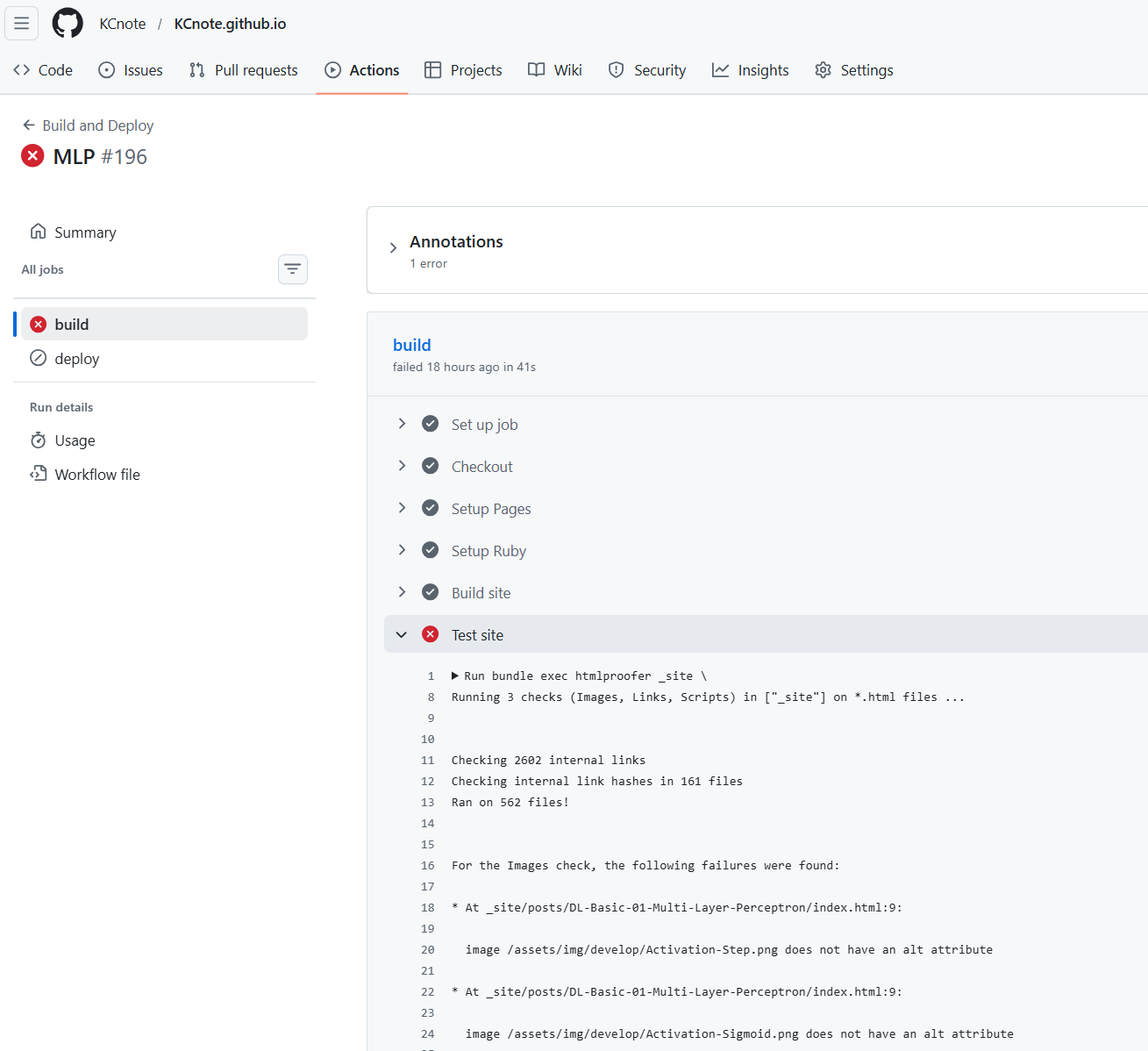
- $Set: up: job$: GitHub created a virtual machine and initializaed the workflow.
- $Checkout$: The repository code was cloned into the runner environment.
- $Setup: Pages$: GitHub Pages environment was configured.
- $Setup: Ruby$: Ruby was installed and configured properly for the build process.
- $Build: site$: Program build the static site and generated the directory.
- $Test: site$: Check the validation step.
- $Upload: site: artifact$: Generated build output as an artifact so that it can be used in later stages of the workflow, such as deployment.
- $Post: Checkout$: Cleanup operations after the checkout step
- $Complete: job$: The workflow finished.
3. How use Continuous Integration(CI) & Continuous Deployment(CD)?
1
Command
1
2
3
4
5
6
7
8
9
10
11
12
13
14
15
16
17
18
19
20
21
22
23
24
25
26
27
28
29
30
31
32
33
34
35
36
37
38
39
40
41
42
43
44
45
46
47
48
49
50
51
52
53
54
55
56
57
58
59
60
61
62
63
64
65
66
67
68
69
70
71
72
73
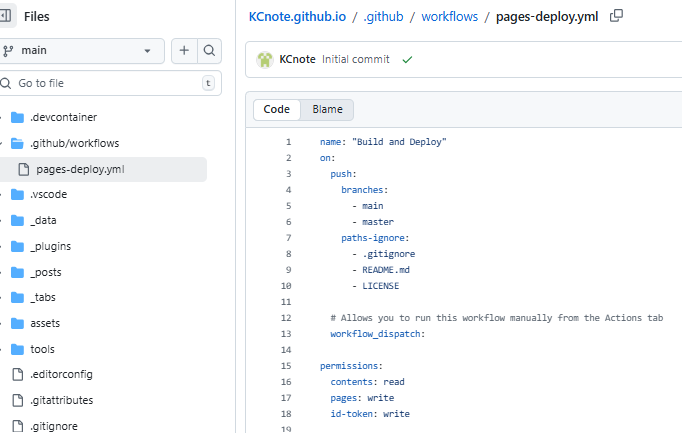
name: "Build and Deploy"
on:
  push:
    branches:
      - main
      - master
    paths-ignore:
      - .gitignore
      - README.md
      - LICENSE

  # Allows you to run this workflow manually from the Actions tab
  workflow_dispatch:

permissions:
  contents: read
  pages: write
  id-token: write

# Allow one concurrent deployment
concurrency:
  group: "pages"
  cancel-in-progress: true

jobs:
  build:
    runs-on: ubuntu-latest

    steps:
      - name: Checkout
        uses: actions/checkout@v4
        with:
          fetch-depth: 0
          # submodules: true
          # If using the 'assets' git submodule from Chirpy Starter, uncomment above
          # (See: https://github.com/cotes2020/chirpy-starter/tree/main/assets)

      - name: Setup Pages
        id: pages
        uses: actions/configure-pages@v4

      - name: Setup Ruby
        uses: ruby/setup-ruby@v1
        with:
          ruby-version: 3.3
          bundler-cache: true

      - name: Build site
        run: bundle exec jekyll b -d "_site$"
        env:
          JEKYLL_ENV: "production"

      - name: Test site
        run: |
          bundle exec htmlproofer _site \
            \-\-disable-external \
            \-\-ignore-urls "/^http:\/\/127.0.0.1/,/^http:\/\/0.0.0.0/,/^http:\/\/localhost/"

      - name: Upload site artifact
        uses: actions/upload-pages-artifact@v3
        with:
          path: "_site$"

  deploy:
    environment:
      name: github-pages
      url: $
    runs-on: ubuntu-latest
    needs: build
    steps:
      - name: Deploy to GitHub Pages
        id: deployment
        uses: actions/deploy-pages@v4
1. Section 1. name of CI pipeline
1
name: "Build and Deploy"
2. Section 2. trigger of CI pipline
1
2
3
4
5
on:
  push:
    branches:
      - main
      - master
If we push the code on another branch or name, it won’t be prcoessed
3. Section 3. Ignore files of CI pipline when we’ll push
1
2
3
4
paths-ignore:
  - .gitignore
  - README.md
  - LICENSE
4. Section 4. Allows you to run this workflow manually from the Actions tab
1
workflow_dispatch:
5. Section 5. Set authorization for CD
1
2
3
4
permissions:
  contents: read
  pages: write
  id-token: write
6. Section 6. Control process with another process at the same time
1
2
3
concurrency:
  group: "pages"
  cancel-in-progress: true
7. Section 7. CI step
7-1. Build job
$\rightarrow Process: on: Ubuntu: Virutal: Server $
7-2. Checkout
$\rightarrow Clone: code: from: Github: to: CI: Server $
7-3. Setup Pages
$\rightarrow Prepare: environment: of: Github: page$
7-4. Setup Ruby
$\rightarrow Install: Ruby: and: activate: bundler: caches$
7-5. Build Site
$\rightarrow Trasnform: Markdown: to: HTML: and: Make: $ _ $site: folder$
❗7-6. Test Site
$\rightarrow Check: Validation$
7-7. Uplod Site Artifact for deploy job
$\rightarrow Save: from: $ _ $site: to: artifact$
8. Section 8. CD step
8-1. Deploy Job
Another Example
- Python
- hierarchical structure
1
2
3
4
5
project/
project/
 ├── app.py
 ├── test_app.py
 └── .github/workflows/ci.yml
- yml
1
2
3
4
5
6
7
8
9
10
11
12
13
14
15
16
17
name: CI

on:
  push:
    branches: [ main ]

jobs:
  test:
    runs-on: ubuntu-latest
    steps:
      - uses: actions/checkout@v4
      - name: Setup Python
        uses: actions/setup-python@v5
        with:
          python-version: 3.11
      - run: pip install pytest
      - run: pytest
- C++
- hierarchical structure
1
2
3
4
5
6
7
8
9
project/
 ├── src/
 │    └── add.cpp
 ├── include/
 │    └── add.h
 ├── tests/
 │    └── test_add.cpp
 ├── CMakeLists.txt
 └── .github/workflows/ci.yml
- yml
1
2
3
4
5
6
7
8
9
10
11
12
13
14
15
16
17
18
19
20
21
22
23
24
name: C++ CI

on:
  push:
    branches: [ main ]

jobs:
  build-and-test:
    runs-on: ubuntu-latest

    steps:
      - uses: actions/checkout@v4

      - name: Install dependencies
        run: sudo apt-get install -y cmake libgtest-dev

      - name: Configure
        run: cmake -S . -B build

      - name: Build
        run: cmake --build build

      - name: Run Tests
        run: ctest --test-dir build
- CMake
1
2
3
4
5
6
7
8
9
10
11
12
13
14
15
16
#CMake
cmake_minimum_required(VERSION 3.14)
project(MyProject)

set(CMAKE_CXX_STANDARD 17)

add_library(add src/add.cpp)
target_include_directories(add PUBLIC include)

enable_testing()
find_package(GTest REQUIRED)

add_executable(runTests tests/test_add.cpp)
target_link_libraries(runTests add GTest::GTest GTest::Main)

add_test(NAME AddTests COMMAND runTests)
CMake is a build system generator that simplifies cross-platform compilation, dependency management, and testing in C++ projects. That’s why we use CMake